
No-Code Tools in Data Analysis: Revolutionizing Insights in 2025
This article explores the top no-code tools for data analysis in 2025, their features, use cases, and how they can transform your workflow.

In today’s data-driven world, the ability to analyze and interpret data is critical for businesses and individuals alike. However, not everyone has the time or expertise to master programming languages like Python or SQL. Enter no-code tools—platforms that empower users to perform sophisticated data analysis without writing a single line of code. These tools leverage intuitive interfaces, drag-and-drop functionalities, and artificial intelligence to make data visualization, preparation, and advanced analytics accessible to all. Let’s dive in:
Introduction to No-Code Tools
No-code tools are software platforms that allow users to create applications, automate processes, or analyze data using visual interfaces rather than traditional coding. In the context of data analysis, these tools enable analysts to manipulate datasets, create interactive dashboards, and even build predictive models through drag-and-drop components, pre-built templates, and AI-driven automation. The rise of no-code platforms has democratized data analysis, allowing professionals with varying technical backgrounds to derive actionable insights efficiently.
The benefits of no-code tools for data analysts are numerous:
Speed: Analysts can prototype and deploy analyses faster without coding bottlenecks.
Accessibility: Non-technical users can participate in data projects, broadening team contributions.
Cost-Effectiveness: Reduced reliance on specialized developers lowers operational costs.
Flexibility: Tools support iterative workflows, enabling quick adjustments to analyses.
As we navigate 2025, no-code tools continue to evolve, incorporating advanced AI features like natural language processing and automated machine learning (AutoML). This article highlights the most prominent tools, categorized by their primary functions, to help data analysts choose the right solutions for their needs.
Popular No-Code Tools for Data Analysis
Data Visualization Tools
Data visualization is a cornerstone of data analysis, transforming raw numbers into compelling stories. The following tools excel in creating interactive dashboards and reports without requiring coding skills.
Tableau
Tableau is a market-leading data visualization platform known for its user-friendly interface and powerful analytics capabilities. It allows users to create stunning visualizations and interactive dashboards with a drag-and-drop interface.
Key Features:
Intuitive drag-and-drop interface for building visualizations.
Wide range of visualization options, including charts, maps, and graphs.
Connectivity to numerous data sources, such as databases, spreadsheets, and cloud services.
Support for custom calculations and expressions without coding.
Robust online community and extensive learning resources.
Use Case: Ideal for creating visually appealing reports to present sales trends, customer behavior, or operational metrics to stakeholders.
Pricing: Offers various plans, starting with a free trial and paid subscriptions from approximately $70/month per user.
Microsoft Power BI
Microsoft Power BI is a business intelligence tool that integrates seamlessly with the Microsoft ecosystem, offering interactive visualizations and data exploration capabilities.
Key Features:
Seamless integration with Microsoft products like Excel and Azure.
Support for custom visuals and extensions through a marketplace.
Compatibility with a wide range of data sources, including on-premises and cloud databases.
Large online community and comprehensive documentation.
Real-time data refresh for dynamic dashboards.
Use Case: Perfect for organizations using Microsoft tools, enabling analysts to create dashboards for financial reporting or operational analytics.
Pricing: Free desktop version available; Pro version starts at $10/month per user.
Google Data Studio
Google Data Studio is a free tool that allows users to create customizable, shareable dashboards and reports, particularly suited for those already using Google’s suite of services.
Key Features:
Integration with Google Analytics, Google Sheets, and other Google services.
Pre-built data connectors for various third-party sources.
Customizable dashboards with real-time collaboration features.
Wide range of visualization options, including maps and time-series charts.
Fully free with no subscription costs.
Use Case: Great for small businesses or teams needing cost-effective solutions to visualize marketing campaign performance or website analytics.
Pricing: Free, with optional paid connectors for advanced integrations.
Data Preparation and Blending Tools
Data preparation is often the most time-consuming part of analysis, involving cleaning, transforming, and integrating data from multiple sources. No-code tools simplify this process with visual workflows.
Alteryx
Alteryx is a leading platform for data preparation, blending, and analytics, offering a visual interface to streamline complex data tasks.
Key Features:
Drag-and-drop tools for data integration, cleaning, and transformation.
Over 300 pre-built tools for various data manipulation tasks.
Integration with 80+ data sources, including databases, APIs, and cloud platforms.
Generative AI for automated insights and recommendations.
Automation of repetitive workflows to save time.
Use Case: Suitable for analysts preparing large, disparate datasets for analysis, such as combining customer data from CRM systems and sales databases.
Pricing: Offers a free trial; paid plans start at approximately $5,000/year for enterprise users.
End-to-End Data Science Platforms
Some no-code tools provide comprehensive solutions, covering data integration, analysis, machine learning, and visualization in a single platform.
KNIME
KNIME is an open-source data analytics platform that supports the entire data science lifecycle through a visual workflow builder.
Key Features:
Visual interface with over 1000 modules for data processing, machine learning, and visualization.
Integration with popular machine learning libraries and 300+ data connectors.
Support for big data environments like Hadoop and Spark.
Free and open-source, with optional paid enterprise features.
Community-driven extensions for added functionality.
Use Case: Ideal for analysts building end-to-end data pipelines, from data cleaning to predictive modeling, without coding.
Pricing: Free for the Analytics Platform; enterprise solutions have custom pricing.
Predictive Analytics and Machine Learning Tools
No-code platforms are increasingly incorporating AI and machine learning, enabling analysts to build predictive models without technical expertise.
Akkio
Akkio is a no-code platform designed for predictive analytics, allowing users to create and deploy machine learning models effortlessly.
Key Features:
Simple interface for building predictive models with drag-and-drop.
Generative AI chatbot for natural language data queries (e.g., “Show me sales trends”).
Integration with Google Sheets, APIs, and other data sources.
Fast model training for quick insights.
Limited free trial with affordable paid plans.
Use Case: Popular among marketers and agencies needing predictive insights, such as customer churn or campaign performance forecasts.
Pricing: Starts at $50/month for premium plans.
DataRobot
DataRobot is an enterprise-grade AI platform that automates the end-to-end process of building, deploying, and maintaining machine learning models.
Key Features:
Automated machine learning (AutoML) for model creation and optimization.
Support for large datasets and complex models.
Integration with cloud services and enterprise data sources.
Advanced governance and security features.
Custom pricing based on enterprise needs.
Use Case: Best for large organizations requiring scalable AI solutions, such as fraud detection or supply chain optimization.
Pricing: Custom pricing, typically for enterprise clients.
Obviously AI
Obviously AI specializes in time-series forecasting and predictive analytics, offering a user-friendly interface for quick model building.
Key Features:
Rapid model creation for predictions, often in minutes.
Integration with spreadsheets like Excel and Google Sheets.
Intuitive interface for non-technical users.
Support for time-series data analysis.
Affordable pricing for small businesses.
Use Case: Suitable for freelancers or small businesses needing quick predictions, such as sales forecasting or inventory planning.
Pricing: Starts at $39/month.
Emerging Tools
New tools are continually entering the no-code space, offering innovative features for data analysis.
Data Formulator by Microsoft
Data Formulator is an open-source, AI-powered tool from Microsoft Research that combines user interface interactions and natural language inputs to create rich visualizations iteratively.
Key Features:
Iterative visualization creation with AI-driven data transformation.
Drag-and-drop UI combined with natural language for chart design.
Support for large datasets via backend databases like DuckDB.
Open-source, freely available on GitHub.
Interactive data exploration with sampling and sorting options.
Use Case: Ideal for analysts creating complex visualizations from raw data, such as exploring sales data or scientific datasets.
Pricing: Free, as it is open-source.
JuliusAI
Mentioned in recent X posts, JuliusAI allows users to analyze data using natural language queries, generating charts and insights instantly.
Key Features:
Natural language processing for conversational data analysis.
Instant generation of charts, summaries, and insights.
Integration with various data sources.
User-friendly for non-technical analysts.
Use Case: Useful for quick, ad-hoc analyses, such as generating reports from marketing data or financial metrics.
Pricing: Not specified in available sources; likely offers a freemium model.
Choosing the Right Tool
Selecting the best no-code tool depends on your specific needs and constraints. Consider the following factors:
Ease of Use: Tools like Google Data Studio and Akkio have minimal learning curves, while KNIME may require more time to master its extensive features.
Features: Ensure the tool supports your required tasks, such as visualization (Tableau), data prep (Alteryx), or machine learning (DataRobot).
Cost: Free options like Google Data Studio and KNIME are ideal for budget-conscious users, while enterprise tools like DataRobot may require significant investment.
Integration: Check compatibility with your data sources, such as CRMs, databases, or cloud platforms.
Scalability: For large datasets or complex analyses, tools like Alteryx and DataRobot offer robust performance.
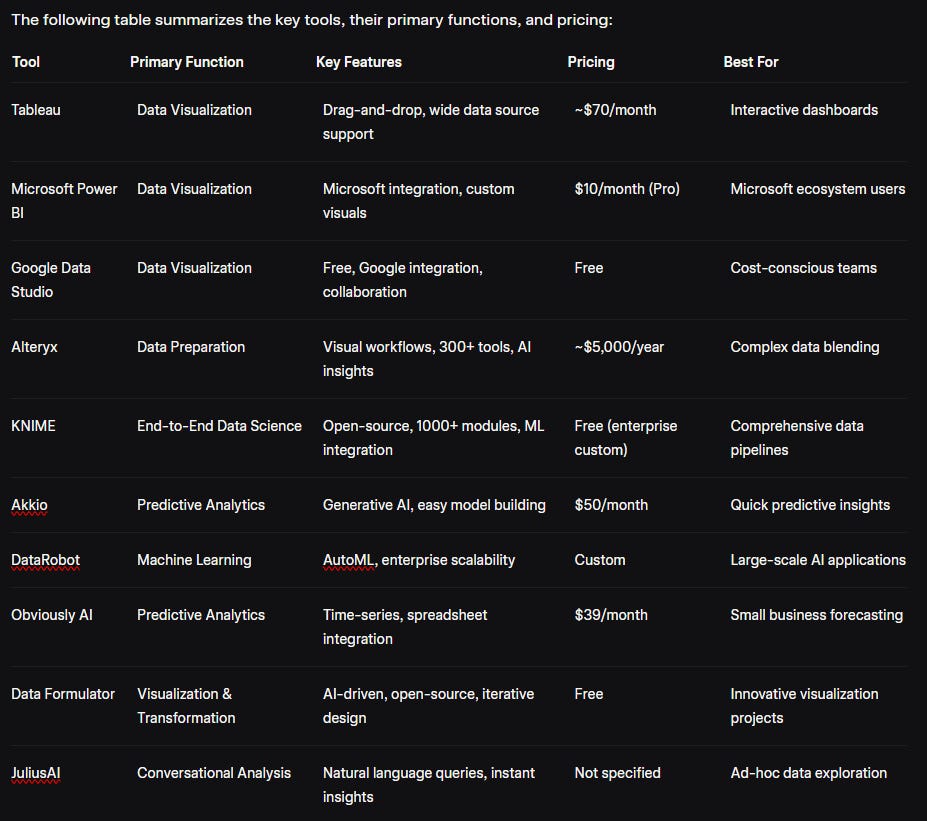
Real-World Insights
Recent discussions on X highlight the growing popularity of no-code tools. For instance, an X post by @Sumanth_077 praised Data Formulator for its AI-powered visualization capabilities, noting its open-source nature as a significant advantage. Another post by @HeyAmit_ introduced JuliusAI, emphasizing its ability to generate insights through natural language, which resonates with analysts seeking quick results.
However, some tools face criticism. An X post on Reddit criticized Alteryx for creating complex workflows that are hard to maintain, suggesting that no-code tools may not always replace coding for advanced users. This underscores the importance of aligning tool choice with project complexity.
Conclusion
No-code tools are transforming data analysis by making it faster, more accessible, and inclusive. From visualization powerhouses like Tableau and Power BI to comprehensive platforms like KNIME and AI-driven tools like Akkio and Data Formulator, there’s a solution for every analyst’s needs. As these tools continue to evolve with AI advancements, they promise to further simplify data workflows in 2025 and beyond. Whether you’re a seasoned analyst or just starting, exploring these no-code platforms can enhance your ability to uncover insights and drive impact. Start with free trials or open-source options to find the perfect fit for your data journey.
Connect with me on LinkedIn